
Model Pricing and Credit Consumption Guide
Credit Consumption Explanation 🔋
FeelFish consumes credits when making AI requests to cover the computing power costs charged by large model providers. Different large models consume credits at different rates. The content sent to the AI and the content returned by the AI also consume different amounts of credits.
Taking the currently recommended DeepSeek V3.2 model in FeelFish as an example, here is a general explanation of the credit consumption rules:
- ➡️ You initially send 100 characters to the AI, consuming approximately 2000 credits.
- ⬅️ The AI returns 100 characters, consuming approximately 3000 credits.
- 🔁 You continue sending another 100 characters to the AI. This time, it includes the previous 200 characters. These 200 characters also incur a cost, but due to caching, it's much cheaper—only about one-tenth of the original cost, roughly 400 credits. Adding the cost for the new 100 characters sent, this step consumes 2400 credits.
- 📈 If you continue creating within a single conversation, the historical messages sent to the AI will accumulate. However, there is an upper limit. As it approaches this limit, FeelFish will automatically trigger compression/summarization to reduce credit consumption. When near the upper limit, each request may consume approximately 280,000 credits (based on the annual membership price, this is roughly ¥0.035 RMB).
Based on our experience, an estimated 100 million credits can produce roughly over 100,000 characters 📚 if the creation process is efficient (with fewer back-and-forth revisions). If there are more revisions, it might produce around 20,000 to 30,000 characters ✍️. Of course, theoretically, 100 million credits could return millions of characters. However, in actual creation, the characters returned by the AI do not directly equal the final novel content. Therefore, the actual consumption depends on individual creation habits. For example, if you prefer using the Auxiliary Creation Panel rather than the Agent, credit consumption should be lower. This is because each new Auxiliary Creation Panel session is a new conversation and does not carry the credit cost of old historical messages.
Frequently Asked Questions ❓
❓ Why are credits consumed so quickly?
Because the content sent to the AI also consumes credits. When a conversation becomes too long, the amount of content sent to the AI per request increases significantly, leading to higher credit consumption per request. However, due to caching, historical messages cost only about one-tenth of new messages (for DeepSeek V3.2).
It's also possible you are using a model like ChatGPT. Overseas models generally have higher consumption. For example, GPT-5.1 consumes nearly five times the credits of DeepSeek V3.2 ⚠️. These costs are paid to the large model providers for computing power. Therefore, if you are on a budget, we recommend choosing the suggested models for the best value for money 💰.
❓ Are there ways to reduce credit consumption?
- 🧠 Task Separation: When creating with the Agent, start a new conversation for each independent task. This way, each task carries less contextual history, resulting in relatively lower credit consumption. For example, after continuously writing three chapters, if you need to add a new character—a task unrelated to writing the previous chapters—you can start a new conversation for the "add new character" task.
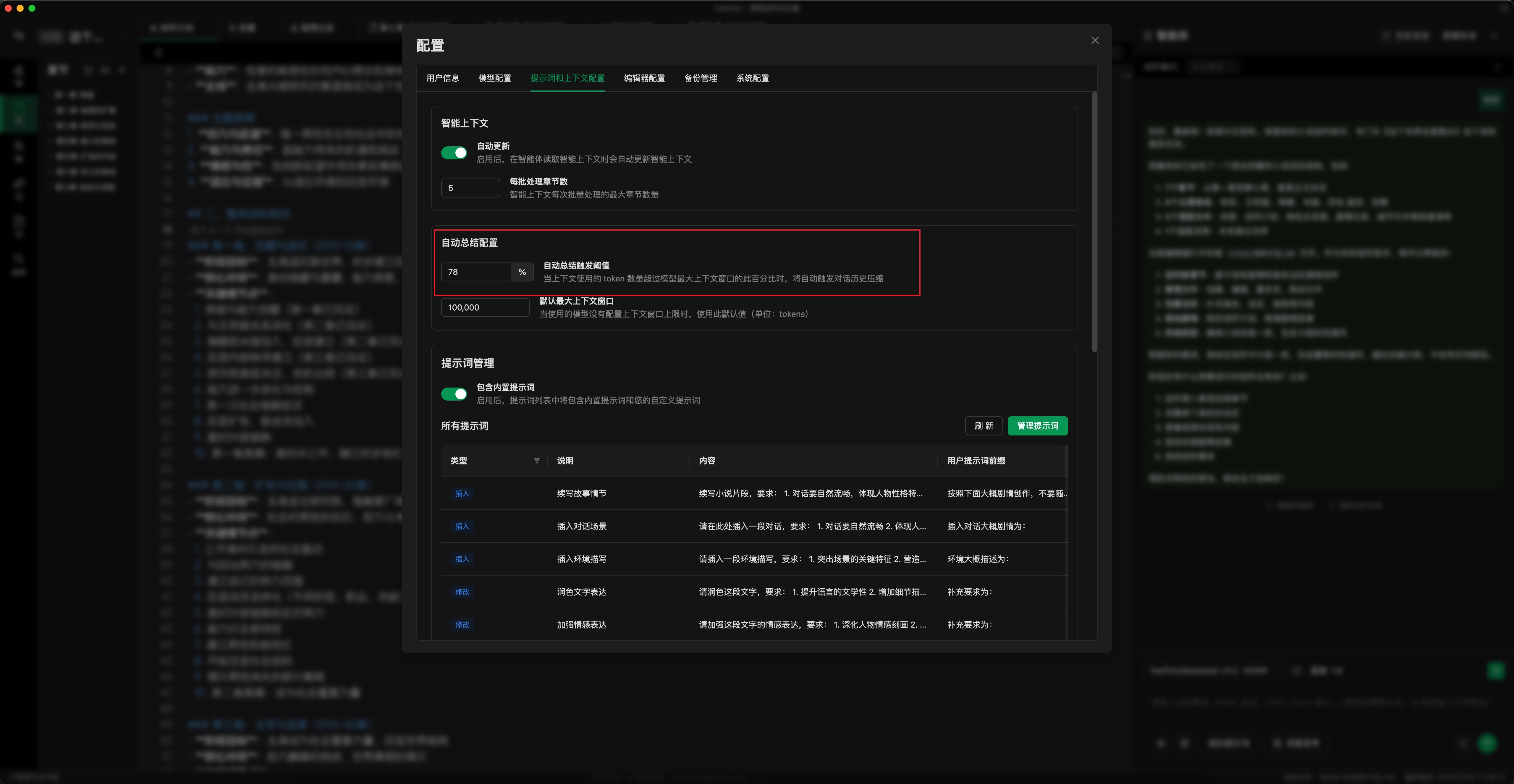
- ⚙️ Set Auto-Summarization Threshold: As shown in the image below, set the auto-summarization threshold according to your usage. A lower threshold triggers summarization earlier (you can also manually click "Summarize and Continue"). This caps the maximum credit consumption per request. The default is 78%; you can adjust it to 50-70%. (Configuration location: Settings Popup -> Prompts & Context -> Auto-Summarization Settings)
- ✏️ Use the Auxiliary Creation Panel: For detailed edits, use the Auxiliary Creation Panel. This allows for more precise modification of specific content, reducing the number of back-and-forth dialogues with the AI and lowering credit consumption.
- 💾 Use Model Services with Input Caching: Whenever possible, use model services with input caching (like DeepSeek). This reduces the credit cost of historical messages (e.g., for DeepSeek V3.2, historical messages cost about one-tenth of new messages).
- 🤖 Choose the Right Model: Select an appropriate model for your tasks. For daily creation, using the latest DeepSeek model is recommended.
As large models continue to develop and computing power becomes more abundant, the prices charged by large model providers will decrease. FeelFish will correspondingly adjust its credit consumption rules to strive for a better user experience.
❓ How can I view the credit consumption for each request?
You can view the credit consumption for each request in the log located in the status bar at the bottom of the FeelFish client editor 📊.

❓ Do all models have caching for historical messages?
No, different models have different caching logic and pricing. 🔍 DeepSeek caches historical messages for periods ranging from tens of minutes to several hours. However, its caching capability is generally reliable, with historical messages costing about one-tenth of new messages. For most users, we recommend using the default model, which we have selected for its better cost-effectiveness.
GPT-5.1 and GLM models also have relatively reliable caching but are more expensive 💸. The caching logic for other models is less certain, so they are not recommended for use within Agents (which rely on multi-turn dialogues benefiting from cache for reduced consumption). However, they can be used in the Auxiliary Creation Panel.
Detailed Credit Consumption Explanation 🔍
🔊 Most of FeelFish's costs come from computing power consumption charged by large model providers, corresponding to AI Token consumption. FeelFish supports major global models. For the same AI request, you can choose different models. Since different models have different Token prices, FeelFish uses a unified credit system to measure computing power consumption.
Therefore, different models have their own credit consumption rates per Token. Taking DeepSeek V3.2 as an example, every 1 million Tokens (roughly corresponding to nearly 2 million characters, noting that Tokens and characters are not perfectly equivalent) for input consumes 28,000,000 credits, and for output consumes 42,000,000 credits. This roughly translates to 28 credits consumed for every two characters sent, and 42 credits for every two characters returned. ⚖️
🧑💻 Of course, during actual creation, the number of Tokens consumed to produce content is variable. Therefore, the actual credit consumption during creation depends on the creator's working style.
Please log in and visit Credit Consumption to view the actual credit consumption corresponding to Tokens for all supported large models. 🔗
Due to different caching strategies and billing prices across models, this document is for reference only. The final cost is subject to the actual Token consumption billing by the large model providers.