
Writing Tips: Smart Context
🧠 Smart Context
🤔 What is Smart Context?
Smart Context is a powerful feature of FeelFish that automatically generates novel style, character information, and other content based on existing content, providing richer and more accurate context to large language models more intelligently. Making novel creation easier and more efficient! ✨
When creating novels in FeelFish, we typically start by setting rules and characters, then create the novel based on these settings. The large language model will create better novels according to our settings.
However, as novel creation progresses, maintaining characters and rules becomes very troublesome. Smart Context can automatically generate novel style, character information, and other content based on existing content, making it more convenient to provide richer and more accurate context to large language models, helping us create novels with more coherent plots and consistent styles. 🎯
➕ How to Create New Smart Context?
As shown in the figure below, in the rules list, we've added a button to create smart context:

📝 Creation Steps:
- Click the Create Button - Find the "Create Smart Context" button in the rules list
- Enter a Name - Enter a descriptive name for your smart context
- Confirm Creation - Click confirm to create the smart context
💡 Tip: Smart Context cannot be edited. It is automatically generated by FeelFish to ensure content accuracy and consistency.
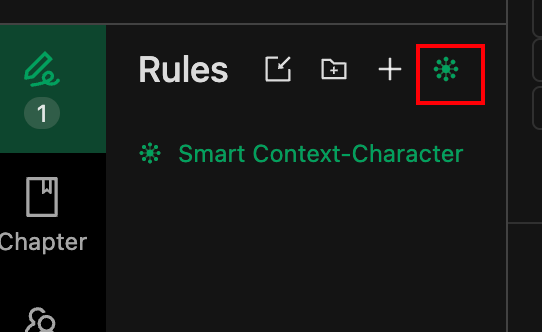
This way, FeelFish will include Smart Context during creation! 🚀
⚙️ How to Customize Smart Context Generation Rules?
After you become familiar with using Smart Context, you may have more advanced needs. For example, you might want a Smart Context that only helps generate character information without generating novel style.
In FeelFish, you can achieve this by customizing the prompts used for Smart Context generation. As shown in the figure below, when you open a Smart Context rule file, there will be a selection above it where you can choose the prompts used by Smart Context.

🎯 Usage Recommendations
- When to Enable Smart Context – Enable smart context after you have already generated some content.
- Using Smart Context for Book Analysis and Breakdown – You can import an entire work, create a new smart context, and analyze the book's content.
- Use Suitable Prompts – Prompts are customizable. Using appropriate prompts can provide information that is easier for the AI to understand.
- Use Meaningful Names for Multiple Smart Contexts – This helps the AI roughly understand the purpose of each smart context from the filename, for example, names like "Smart Context - Character Relationship Map".
How Much Do Smart Context Credits Cost?
Currently, the default analysis is based on DeepSeek 3.2. Analyzing approximately one million words consumes about 20 million credits. If you have multiple smart contexts, caching helps reduce credit consumption due to reuse. Adding a new smart context typically consumes around 5 million credits. However, because cache validity is limited (ranging from a few hours to several days), adding new smart contexts later may still incur higher credit costs. Actual consumption is subject to the large model service's real-time usage.
Give it a try! To create better novels, smart context is your great assistant! 📚